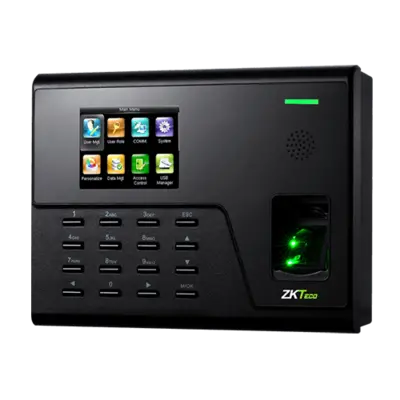
Managing employee attendance in Dubai’s fast-paced business environment requires precision and reliability. The UA760 Biometric Attendance System delivers exactly what you need in a professional grade biometric solution designed for modern UAE businesses seeking accurate time tracking without the complexity.
What ByteFlow Offers with UA760
We provide complete biometric attendance system installation across Dubai, featuring the UA760 a compact 2.8-inch color screen terminal powered by advanced Z-ID fingerprint technology. This isn’t just an attendance device, it’s a complete workforce management solution for your small business needs.
The system stores 3,000 employees and captures up to 50,000 attendance records. With built-in WiFi connectivity, TCP/IP, and USB support, you get flexible data management options that fit your office infrastructure. Whether you’re running a small company in DIFC or managing a warehouse in UAE, the UA760 adapts to your needs.
Optional upgrades include IC/ID card readers for dual verification, ADMS for cloud-based management, and backup battery protection essential for Dubai’s summer power demands like it work according to dubai’s weather.
Who Benefits from This UA760 Biometric Attendance System?
Small to Medium Enterprises across Dubai find the UA760 particularly valuable. If you’re managing 10 to 300 employees, this system hits the sweet spot between functionality and affordability.
Ideal for:
- Trading companies in business districts
- Retail stores across Dubai Mall, Mall of Emirates, and standalone outlets
- Manufacturing units in Dubai Industrial City
- Warehouses and logistics centers
- Construction site offices
- Healthcare clinics and dental practices
- Educational institutions and training centers
Key Specifications:
- 3,000 user capacity
- WiFi, TCP/IP, and USB connectivity
- Works in 0°C – 45°C temperature range
- Compatible with ZKBio Time software
Quick Installation Steps
1. Choose Installation Location
Mount the device near your main entrance at 4.5-5 feet height. Avoid direct sunlight and ensure protection from dust. The UA760 handles Dubai’s climate perfectly when installed in covered areas.
2. Mount the Device
- Use the provided bracket and screws
- Ensure stable mounting on a solid wall
- Keep away from heat sources
3. Power Connection
Connect the power adapter. The device boots up and displays the home screen within seconds.
4. Network Setup
For WiFi:
- Go to Menu > Communication > WiFi
- Select your network name
- Enter WiFi password
- Note the IP address displayed
For LAN Cable:
- Connect ethernet cable to your router
- Device automatically obtains IP address
- Note IP from System > Device Info
5. Install Management Software
Compatible Software & Integrations
The UA760 works seamlessly with:
- ZKBio Time – Basic attendance management
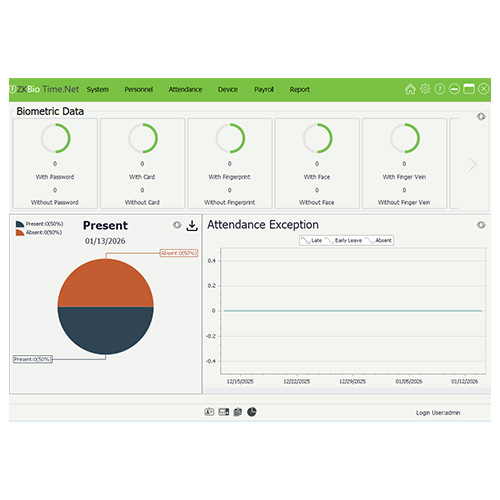
- ZKBio Time.Net – Advanced reporting & analytics
Choose best one for your business needs:
- Download ZKBio Time software on your computer
- Launch software and add device using IP address
- Test connection status should show “Connected”
6. Enroll Employees
- Open User Management in software
- Add employee ID, name, and department
- Register fingerprints (2 fingers recommended per person)
- Press finger firmly on sensor 3 times for each fingerprint
- Sync data to device
7. Configure Settings
- Set date/time to Dubai timezone (GMT+4)
- Configure attendance rules
- Set shift timings if applicable
- Enable auto-sync for real-time updates
8. Test the System
Have employees clock in/out to verify fingerprint recognition and data sync.
Optional Upgrades
- IC/ID Card Reader: For dual verification
- Backup Battery: Prevents data loss during power cuts
- ADMS Cloud: Remote management from anywhere in Dubai
Troubleshooting Tips
Fingerprint not recognized?
- Clean the sensor with a soft cloth
- Ensure fingers are clean and dry
- Re-register fingerprint if needed
Device offline?
- Check WiFi/LAN connection
- Verify IP address hasn’t changed
- Restart the device
Why ByteFlow for Your Installation?
We provide complete biometric attendance system installation across Dubai with:
- Professional mounting and setup
- Employee training sessions
- Ongoing technical support
- Integration with payroll systems
Perfect for small to medium businesses seeking accurate employee attendance tracking without monthly subscription fees.
Ready to upgrade your attendance system? Contact ByteFlow Dubai for professional installation and setup support.